
Swissradio3.2.0 - App Store
You'll be able to see results in few seconds.
Publisher Description

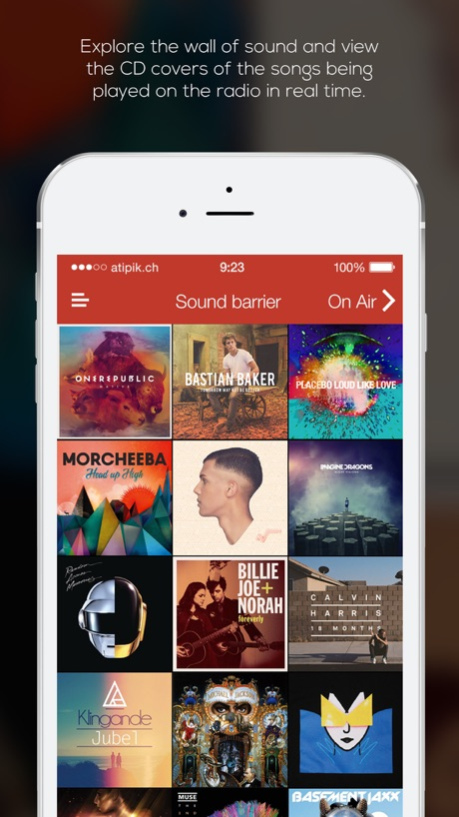
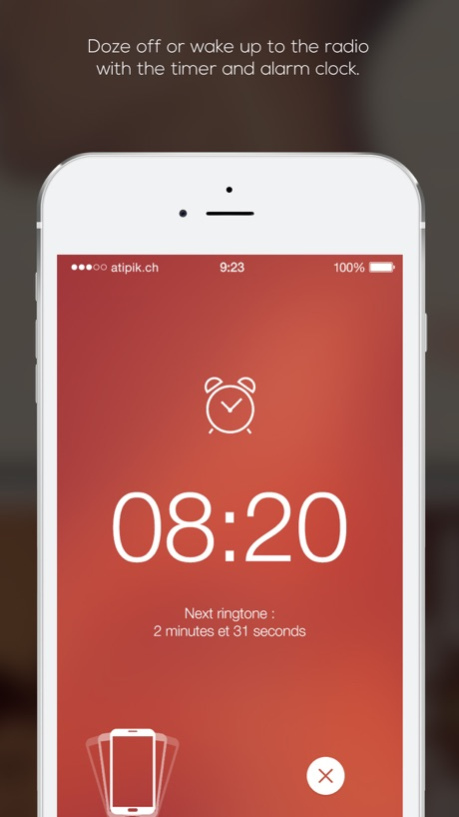
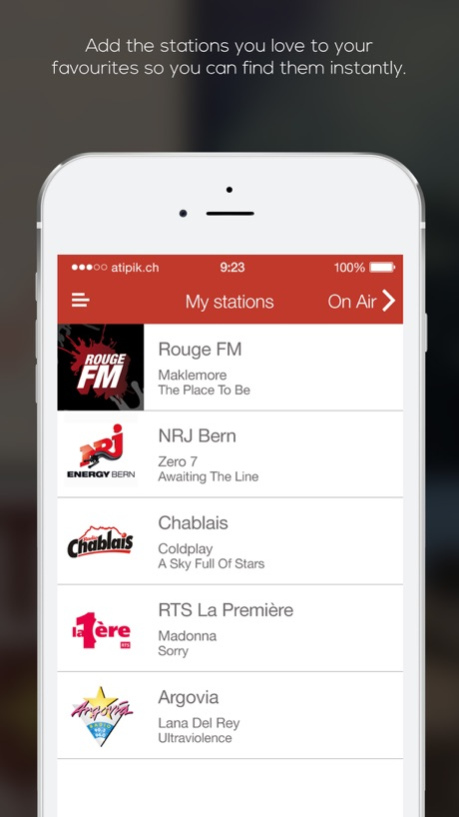
Discover version 3 of the number 1 application in Switzerland.
Discover this completely innovative version, a unique way to listen to your favourite stations. No more slow and hard-to-use applications with thousands of stations you'll never listen to. SwissRadio allows you to listen to your stations instantaneously and browse songs being played in real time or stations' playlists.
Some of the new features:
. Wall of Sound
Discover another way to listen to the radio! The "Wall of Sound" feature shows the CD covers in real time of the songs being played on radio stations. You can choose the tune you want to listen to right now!
. Playlists
Discover playlists from your favourite stations, list the songs played on the air and download them.
. Your favourite tunes
Like the song currently playing? Add it to your favourites, listen to it later or download it from iTunes.
. Your favourite radio stations
Put the stations you listen to the most in your favourites and see what song is currently playing.
. Car mode
When you're behind the wheel, the car mode changes how the player looks and how you change stations, turning your smartphone into a real car radio.
Choose from over 150 radios and online stations, including: DRS (1,2,3), RSR, Option Musique, Couleur 3, Rouge FM, One FM, Yes FM, LFM, NRJ Zurich, Radio 105, Radio Jazz, Radio Swiss Pop, RSI (1,2,3)
We'd love you hear from you!
Want to add a radio station?
Questions?
Suggestions?
No problem - just get in touch with us by e-mail (info@atipik.ch) and we'll get back to you as quickly as we can.
Happy listening :)
Version History SwissRadio is now compatible with iOS 11 and the brand new iPhone X. 3.2.0 10/10/2017 In order to offer you an ever more powerful application, minor updates of SwissRadio are available in the App Store. They include in particular speed and reliability improvements.
You can configure your device so that updates are made automatically: go to Settings > iTunes Store and App Store > under Automatic downloads > enable Updates.
Thank you for using SwissRadio 3.1.6 11/01/2016 In order to offer you an ever more powerful application, minor updates of SwissRadio are available in the App Store. They include in particular speed and reliability improvements.
You can configure your device so that updates are made automatically: go to Settings > iTunes Store and App Store > under Automatic downloads > enable Updates.
Thank you for using SwissRadio 3.1.5 10/04/2016 In order to offer you an ever more powerful application, minor updates of SwissRadio are available in the App Store. They include in particular speed and reliability improvements.
You can configure your device so that updates are made automatically: go to Settings > iTunes Store and App Store > under Automatic downloads > enable Updates.
Thank you for using SwissRadio 3.1.4 09/16/2016 In order to offer you an ever more powerful application, minor updates of SwissRadio are available in the App Store. They include in particular speed and reliability improvements.
You can configure your device so that updates are made automatically: go to Settings > iTunes Store and App Store > under Automatic downloads > enable Updates.
Thank you for using SwissRadio 3.1.3 08/10/2015 In order to offer you an ever more powerful application, minor updates of SwissRadio are available in the App Store. They include in particular speed and reliability improvements.
You can configure your device so that updates are made automatically: go to Settings > iTunes Store and App Store > under Automatic downloads > enable Updates.
Thank you for using SwissRadio 3.1.2 05/21/2015 In order to offer you an ever more powerful application, minor updates of SwissRadio are available in the App Store. They include in particular speed and reliability improvements.
You can configure your device so that updates are made automatically: go to Settings > iTunes Store and App Store > under Automatic downloads > enable Updates.
Thank you for using SwissRadio 3.1 03/15/2015 Breaking news. Swissradio has been updated and offers a few changes to improve your experience.
A summary page was added during the discovery of the application concerning the premium mode, which should dispel any doubt as to those stunning features.
In addition, Bluetooth device connection has been improved, allowing you share with your friends and family your favorite radio stations on your trendy hi-fi system.
You will also enjoy improved performance thanks to you, vigilant listener, who did not hesitate to take a moment to send us valuable feedback. 3.0.2 01/08/2015 This new update (3.0.1) contains minor improvements.
--
Discover this completely innovative version, a unique way to listen to your favourite stations.
Some of the new features:
• The wall of sound
Discover another way to listen to the radio! The "wall of sound" shows the CD covers in real time of the songs being played on radio stations. You can choose the tune you want to listen to right now!
• Playlists
Discover playlists from your favourite stations, list the songs played on the air and download them.
• Your favourite tunes
Like the song currently playing? Add it to your favourites, listen to it later or download it from iTunes.
• Your favourite radio stations
Put the stations you listen to the most in your favourites and see what song is currently playing.
• Car mode
When you're behind the wheel, the car mode changes how the player looks and how you change stations, turning your smartphone into a real car radio.
• Alarm Clock
Another excellent function, rather unique on iOS, is that you can tune your alarm clock to the station you want. 3.0.1 12/05/2014 Discover this completely innovative version, a unique way to listen to your favourite stations.
Some of the new features:
• The wall of sound
Discover another way to listen to the radio! The "wall of sound" shows the CD covers in real time of the songs being played on radio stations. You can choose the tune you want to listen to right now!
• Playlists
Discover playlists from your favourite stations, list the songs played on the air and download them.
• Your favourite tunes
Like the song currently playing? Add it to your favourites, listen to it later or download it from iTunes.
• Your favourite radio stations
Put the stations you listen to the most in your favourites and see what song is currently playing.
• Car mode
When you're behind the wheel, the car mode changes how the player looks and how you change stations, turning your smartphone into a real car radio.
• Alarm Clock
Another excellent function, rather unique on iOS, is that you can tune your alarm clock to the station you want. 3 11/26/2014 - bugs fixes 2.2.7 12/02/2013 -iOS 7 implementation 2.2.6 10/12/2013 - Fix list loading 2.2.5 05/06/2013 - Various optimizations 2.2.4 12/11/2012 iOS 6 and iPhone 5 compatibility 2.2.3 10/17/2012 - performances improvement 2.2.2 10/04/2012 -fixes 2.2.1 06/01/2012 - optimizations 2.2 05/09/2012 fixed some ui glitches 2.1.9 01/27/2012 Various bugfixes 2.1.8 01/07/2012 Fixed some issues 2.1.5 07/28/2011 • NEW FEATURES WITH THIS NEW VERSION •
• Dynamic Ranking
The more you listen a radio station, the higher it ranks on the list of station. After just a few days, your favorite radio stations will be at the top of the list, just a click away!
• Song Title Display
Do you love a song you hear on the radio but don’t know what it’s called? With this new feature, you’ll see the song information as the track is being played, like the name of the artist and song title. You can also download the track instantly with iTunes.
• Timer
A function many users asked for, it’s now available. Choose to turn off the radio automatically after a set number of minutes.
• Radio Stations on Facebook
When you listen to the radio, you can now post to the station’s Facebook page, getting up-to-the-minute information, free gifts and offers from your favorite station.
• WebRadio Programs Now Available
Slide your finger over the list of radio programs from right to left and discover more than 100 Swiss webradio programs to listen to as much and as often as you like! 2.1.4 07/14/2011 Fixed a bug that slow the application 1.8 12/08/2010 Fixed some bugs & improved stability 1.7 11/23/2010 Updated for iOS 4 1.4 07/14/2010
About Swissradio
The company that develops Swissradio is Atipik SA. The latest version released by its developer is 3.2.0.
To install Swissradio on your iOS device, just click the green Continue To App button above to start the installation process. The app is listed on our website since 2026-10-14 and was downloaded 0 times. We have already checked if the download link is safe, however for your own protection we recommend that you scan the downloaded app with your antivirus. Your antivirus may detect the Swissradio as malware if the download link is broken.
How to install Swissradio on your iOS device:
- Click on the Continue To App button on our website. This will redirect you to the App Store.
- Once the Swissradio is shown in the iTunes listing of your iOS device, you can start its download and installation. Tap on the GET button to the right of the app to start downloading it.
- If you are not logged-in the iOS appstore app, you'll be prompted for your your Apple ID and/or password.
- After Swissradio is downloaded, you'll see an INSTALL button to the right. Tap on it to start the actual installation of the iOS app.
- Once installation is finished you can tap on the OPEN button to start it. Its icon will also be added to your device home screen.
Program Details
System requirements
Download information
Pricing
Version History
version 3.2.0
posted on 2026-10-14
Version History SwissRadio is now compatible with iOS 11 and the brand new iPhone X. 3.2.0 10/10/2017 In order to offer you an ever more powerful application, minor updates of SwissRadio are available in the App Store. They include in particular speed and reliability improvements.
You can configure your device so that updates are made automatically: go to Settings > iTunes Store and App Store > under Automatic downloads > enable Updates.
Thank you for using SwissRadio 3.1.6 11/01/2016 In order to offer you an ever more powerful application, minor updates of SwissRadio are available in the App Store. They include in particular speed and reliability improvements.
You can configure your device so that updates are made automatically: go to Settings > iTunes Store and App Store > under Automatic downloads > enable Updates.
Thank you for using SwissRadio 3.1.5 10/04/2016 In order to offer you an ever more powerful application, minor updates of SwissRadio are available in the App Store. They include in particular speed and reliability improvements.
You can configure your device so that updates are made automatically: go to Settings > iTunes Store and App Store > under Automatic downloads > enable Updates.
Thank you for using SwissRadio 3.1.4 09/16/2016 In order to offer you an ever more powerful application, minor updates of SwissRadio are available in the App Store. They include in particular speed and reliability improvements.
You can configure your device so that updates are made automatically: go to Settings > iTunes Store and App Store > under Automatic downloads > enable Updates.
Thank you for using SwissRadio 3.1.3 08/10/2015 In order to offer you an ever more powerful application, minor updates of SwissRadio are available in the App Store. They include in particular speed and reliability improvements.
You can configure your device so that updates are made automatically: go to Settings > iTunes Store and App Store > under Automatic downloads > enable Updates.
Thank you for using SwissRadio 3.1.2 05/21/2015 In order to offer you an ever more powerful application, minor updates of SwissRadio are available in the App Store. They include in particular speed and reliability improvements.
You can configure your device so that updates are made automatically: go to Settings > iTunes Store and App Store > under Automatic downloads > enable Updates.
Thank you for using SwissRadio 3.1 03/15/2015 Breaking news. Swissradio has been updated and offers a few changes to improve your experience.
A summary page was added during the discovery of the application concerning the premium mode, which should dispel any doubt as to those stunning features.
In addition, Bluetooth device connection has been improved, allowing you share with your friends and family your favorite radio stations on your trendy hi-fi system.
You will also enjoy improved performance thanks to you, vigilant listener, who did not hesitate to take a moment to send us valuable feedback. 3.0.2 01/08/2015 This new update (3.0.1) contains minor improvements.
--
Discover this completely innovative version, a unique way to listen to your favourite stations.
Some of the new features:
• The wall of sound
Discover another way to listen to the radio! The "wall of sound" shows the CD covers in real time of the songs being played on radio stations. You can choose the tune you want to listen to right now!
• Playlists
Discover playlists from your favourite stations, list the songs played on the air and download them.
• Your favourite tunes
Like the song currently playing? Add it to your favourites, listen to it later or download it from iTunes.
• Your favourite radio stations
Put the stations you listen to the most in your favourites and see what song is currently playing.
• Car mode
When you're behind the wheel, the car mode changes how the player looks and how you change stations, turning your smartphone into a real car radio.
• Alarm Clock
Another excellent function, rather unique on iOS, is that you can tune your alarm clock to the station you want. 3.0.1 12/05/2014 Discover this completely innovative version, a unique way to listen to your favourite stations.
Some of the new features:
• The wall of sound
Discover another way to listen to the radio! The "wall of sound" shows the CD covers in real time of the songs being played on radio stations. You can choose the tune you want to listen to right now!
• Playlists
Discover playlists from your favourite stations, list the songs played on the air and download them.
• Your favourite tunes
Like the song currently playing? Add it to your favourites, listen to it later or download it from iTunes.
• Your favourite radio stations
Put the stations you listen to the most in your favourites and see what song is currently playing.
• Car mode
When you're behind the wheel, the car mode changes how the player looks and how you change stations, turning your smartphone into a real car radio.
• Alarm Clock
Another excellent function, rather unique on iOS, is that you can tune your alarm clock to the station you want. 3 11/26/2014 - bugs fixes 2.2.7 12/02/2013 -iOS 7 implementation 2.2.6 10/12/2013 - Fix list loading 2.2.5 05/06/2013 - Various optimizations 2.2.4 12/11/2012 iOS 6 and iPhone 5 compatibility 2.2.3 10/17/2012 - performances improvement 2.2.2 10/04/2012 -fixes 2.2.1 06/01/2012 - optimizations 2.2 05/09/2012 fixed some ui glitches 2.1.9 01/27/2012 Various bugfixes 2.1.8 01/07/2012 Fixed some issues 2.1.5 07/28/2011 • NEW FEATURES WITH THIS NEW VERSION •
• Dynamic Ranking
The more you listen a radio station, the higher it ranks on the list of station. After just a few days, your favorite radio stations will be at the top of the list, just a click away!
• Song Title Display
Do you love a song you hear on the radio but don’t know what it’s called? With this new feature, you’ll see the song information as the track is being played, like the name of the artist and song title. You can also download the track instantly with iTunes.
• Timer
A function many users asked for, it’s now available. Choose to turn off the radio automatically after a set number of minutes.
• Radio Stations on Facebook
When you listen to the radio, you can now post to the station’s Facebook page, getting up-to-the-minute information, free gifts and offers from your favorite station.
• WebRadio Programs Now Available
Slide your finger over the list of radio programs from right to left and discover more than 100 Swiss webradio programs to listen to as much and as often as you like! 2.1.4 07/14/2011 Fixed a bug that slow the application 1.8 12/08/2010 Fixed some bugs & improved stability 1.7 11/23/2010 Updated for iOS 4 1.4 07/14/2010
version 3.2.0
posted on 2026-09-04
Version History This app has been updated by Apple to prepare for watchOS 27 compatibility. No new features are included.
SwissRadio is now compatible with iOS 11 and the brand new iPhone X. 3.2.0 10/10/2017 In order to offer you an ever more powerful application, minor updates of SwissRadio are available in the App Store. They include in particular speed and reliability improvements.
You can configure your device so that updates are made automatically: go to Settings > iTunes Store and App Store > under Automatic downloads > enable Updates.
Thank you for using SwissRadio 3.1.6 11/01/2016 In order to offer you an ever more powerful application, minor updates of SwissRadio are available in the App Store. They include in particular speed and reliability improvements.
You can configure your device so that updates are made automatically: go to Settings > iTunes Store and App Store > under Automatic downloads > enable Updates.
Thank you for using SwissRadio 3.1.5 10/04/2016 In order to offer you an ever more powerful application, minor updates of SwissRadio are available in the App Store. They include in particular speed and reliability improvements.
You can configure your device so that updates are made automatically: go to Settings > iTunes Store and App Store > under Automatic downloads > enable Updates.
Thank you for using SwissRadio 3.1.4 09/16/2016 In order to offer you an ever more powerful application, minor updates of SwissRadio are available in the App Store. They include in particular speed and reliability improvements.
You can configure your device so that updates are made automatically: go to Settings > iTunes Store and App Store > under Automatic downloads > enable Updates.
Thank you for using SwissRadio 3.1.3 08/10/2015 In order to offer you an ever more powerful application, minor updates of SwissRadio are available in the App Store. They include in particular speed and reliability improvements.
You can configure your device so that updates are made automatically: go to Settings > iTunes Store and App Store > under Automatic downloads > enable Updates.
Thank you for using SwissRadio 3.1.2 05/21/2015 In order to offer you an ever more powerful application, minor updates of SwissRadio are available in the App Store. They include in particular speed and reliability improvements.
You can configure your device so that updates are made automatically: go to Settings > iTunes Store and App Store > under Automatic downloads > enable Updates.
Thank you for using SwissRadio 3.1 03/15/2015 Breaking news. Swissradio has been updated and offers a few changes to improve your experience.
A summary page was added during the discovery of the application concerning the premium mode, which should dispel any doubt as to those stunning features.
In addition, Bluetooth device connection has been improved, allowing you share with your friends and family your favorite radio stations on your trendy hi-fi system.
You will also enjoy improved performance thanks to you, vigilant listener, who did not hesitate to take a moment to send us valuable feedback. 3.0.2 01/08/2015 This new update (3.0.1) contains minor improvements.
--
Discover this completely innovative version, a unique way to listen to your favourite stations.
Some of the new features:
• The wall of sound
Discover another way to listen to the radio! The "wall of sound" shows the CD covers in real time of the songs being played on radio stations. You can choose the tune you want to listen to right now!
• Playlists
Discover playlists from your favourite stations, list the songs played on the air and download them.
• Your favourite tunes
Like the song currently playing? Add it to your favourites, listen to it later or download it from iTunes.
• Your favourite radio stations
Put the stations you listen to the most in your favourites and see what song is currently playing.
• Car mode
When you're behind the wheel, the car mode changes how the player looks and how you change stations, turning your smartphone into a real car radio.
• Alarm Clock
Another excellent function, rather unique on iOS, is that you can tune your alarm clock to the station you want. 3.0.1 12/05/2014 Discover this completely innovative version, a unique way to listen to your favourite stations.
Some of the new features:
• The wall of sound
Discover another way to listen to the radio! The "wall of sound" shows the CD covers in real time of the songs being played on radio stations. You can choose the tune you want to listen to right now!
• Playlists
Discover playlists from your favourite stations, list the songs played on the air and download them.
• Your favourite tunes
Like the song currently playing? Add it to your favourites, listen to it later or download it from iTunes.
• Your favourite radio stations
Put the stations you listen to the most in your favourites and see what song is currently playing.
• Car mode
When you're behind the wheel, the car mode changes how the player looks and how you change stations, turning your smartphone into a real car radio.
• Alarm Clock
Another excellent function, rather unique on iOS, is that you can tune your alarm clock to the station you want. 3 11/26/2014 - bugs fixes 2.2.7 12/02/2013 -iOS 7 implementation 2.2.6 10/12/2013 - Fix list loading 2.2.5 05/06/2013 - Various optimizations 2.2.4 12/11/2012 iOS 6 and iPhone 5 compatibility 2.2.3 10/17/2012 - performances improvement 2.2.2 10/04/2012 -fixes 2.2.1 06/01/2012 - optimizations 2.2 05/09/2012 fixed some ui glitches 2.1.9 01/27/2012 Various bugfixes 2.1.8 01/07/2012 Fixed some issues 2.1.5 07/28/2011 • NEW FEATURES WITH THIS NEW VERSION •
• Dynamic Ranking
The more you listen a radio station, the higher it ranks on the list of station. After just a few days, your favorite radio stations will be at the top of the list, just a click away!
• Song Title Display
Do you love a song you hear on the radio but don’t know what it’s called? With this new feature, you’ll see the song information as the track is being played, like the name of the artist and song title. You can also download the track instantly with iTunes.
• Timer
A function many users asked for, it’s now available. Choose to turn off the radio automatically after a set number of minutes.
• Radio Stations on Facebook
When you listen to the radio, you can now post to the station’s Facebook page, getting up-to-the-minute information, free gifts and offers from your favorite station.
• WebRadio Programs Now Available
Slide your finger over the list of radio programs from right to left and discover more than 100 Swiss webradio programs to listen to as much and as often as you like! 2.1.4 07/14/2011 Fixed a bug that slow the application 1.8 12/08/2010 Fixed some bugs & improved stability 1.7 11/23/2010 Updated for iOS 4 1.4 07/14/2010
version 3.2.0
posted on 2026-08-23
Version History This update from Apple will improve the functionality of this app. No new features are included.
SwissRadio is now compatible with iOS 11 and the brand new iPhone X. 3.2.0 10/10/2017 In order to offer you an ever more powerful application, minor updates of SwissRadio are available in the App Store. They include in particular speed and reliability improvements.
You can configure your device so that updates are made automatically: go to Settings > iTunes Store and App Store > under Automatic downloads > enable Updates.
Thank you for using SwissRadio 3.1.6 11/01/2016 In order to offer you an ever more powerful application, minor updates of SwissRadio are available in the App Store. They include in particular speed and reliability improvements.
You can configure your device so that updates are made automatically: go to Settings > iTunes Store and App Store > under Automatic downloads > enable Updates.
Thank you for using SwissRadio 3.1.5 10/04/2016 In order to offer you an ever more powerful application, minor updates of SwissRadio are available in the App Store. They include in particular speed and reliability improvements.
You can configure your device so that updates are made automatically: go to Settings > iTunes Store and App Store > under Automatic downloads > enable Updates.
Thank you for using SwissRadio 3.1.4 09/16/2016 In order to offer you an ever more powerful application, minor updates of SwissRadio are available in the App Store. They include in particular speed and reliability improvements.
You can configure your device so that updates are made automatically: go to Settings > iTunes Store and App Store > under Automatic downloads > enable Updates.
Thank you for using SwissRadio 3.1.3 08/10/2015 In order to offer you an ever more powerful application, minor updates of SwissRadio are available in the App Store. They include in particular speed and reliability improvements.
You can configure your device so that updates are made automatically: go to Settings > iTunes Store and App Store > under Automatic downloads > enable Updates.
Thank you for using SwissRadio 3.1.2 05/21/2015 In order to offer you an ever more powerful application, minor updates of SwissRadio are available in the App Store. They include in particular speed and reliability improvements.
You can configure your device so that updates are made automatically: go to Settings > iTunes Store and App Store > under Automatic downloads > enable Updates.
Thank you for using SwissRadio 3.1 03/15/2015 Breaking news. Swissradio has been updated and offers a few changes to improve your experience.
A summary page was added during the discovery of the application concerning the premium mode, which should dispel any doubt as to those stunning features.
In addition, Bluetooth device connection has been improved, allowing you share with your friends and family your favorite radio stations on your trendy hi-fi system.
You will also enjoy improved performance thanks to you, vigilant listener, who did not hesitate to take a moment to send us valuable feedback. 3.0.2 01/08/2015 This new update (3.0.1) contains minor improvements.
--
Discover this completely innovative version, a unique way to listen to your favourite stations.
Some of the new features:
• The wall of sound
Discover another way to listen to the radio! The "wall of sound" shows the CD covers in real time of the songs being played on radio stations. You can choose the tune you want to listen to right now!
• Playlists
Discover playlists from your favourite stations, list the songs played on the air and download them.
• Your favourite tunes
Like the song currently playing? Add it to your favourites, listen to it later or download it from iTunes.
• Your favourite radio stations
Put the stations you listen to the most in your favourites and see what song is currently playing.
• Car mode
When you're behind the wheel, the car mode changes how the player looks and how you change stations, turning your smartphone into a real car radio.
• Alarm Clock
Another excellent function, rather unique on iOS, is that you can tune your alarm clock to the station you want. 3.0.1 12/05/2014 Discover this completely innovative version, a unique way to listen to your favourite stations.
Some of the new features:
• The wall of sound
Discover another way to listen to the radio! The "wall of sound" shows the CD covers in real time of the songs being played on radio stations. You can choose the tune you want to listen to right now!
• Playlists
Discover playlists from your favourite stations, list the songs played on the air and download them.
• Your favourite tunes
Like the song currently playing? Add it to your favourites, listen to it later or download it from iTunes.
• Your favourite radio stations
Put the stations you listen to the most in your favourites and see what song is currently playing.
• Car mode
When you're behind the wheel, the car mode changes how the player looks and how you change stations, turning your smartphone into a real car radio.
• Alarm Clock
Another excellent function, rather unique on iOS, is that you can tune your alarm clock to the station you want. 3 11/26/2014 - bugs fixes 2.2.7 12/02/2013 -iOS 7 implementation 2.2.6 10/12/2013 - Fix list loading 2.2.5 05/06/2013 - Various optimizations 2.2.4 12/11/2012 iOS 6 and iPhone 5 compatibility 2.2.3 10/17/2012 - performances improvement 2.2.2 10/04/2012 -fixes 2.2.1 06/01/2012 - optimizations 2.2 05/09/2012 fixed some ui glitches 2.1.9 01/27/2012 Various bugfixes 2.1.8 01/07/2012 Fixed some issues 2.1.5 07/28/2011 • NEW FEATURES WITH THIS NEW VERSION •
• Dynamic Ranking
The more you listen a radio station, the higher it ranks on the list of station. After just a few days, your favorite radio stations will be at the top of the list, just a click away!
• Song Title Display
Do you love a song you hear on the radio but don’t know what it’s called? With this new feature, you’ll see the song information as the track is being played, like the name of the artist and song title. You can also download the track instantly with iTunes.
• Timer
A function many users asked for, it’s now available. Choose to turn off the radio automatically after a set number of minutes.
• Radio Stations on Facebook
When you listen to the radio, you can now post to the station’s Facebook page, getting up-to-the-minute information, free gifts and offers from your favorite station.
• WebRadio Programs Now Available
Slide your finger over the list of radio programs from right to left and discover more than 100 Swiss webradio programs to listen to as much and as often as you like! 2.1.4 07/14/2011 Fixed a bug that slow the application 1.8 12/08/2010 Fixed some bugs & improved stability 1.7 11/23/2010 Updated for iOS 4 1.4 07/14/2010
version 3.2.0
posted on 2017-10-10
This app has been updated by Apple to display the Apple Watch app icon.
SwissRadio is now compatible with iOS 11 and the brand new iPhone X.
version 3.2.0
posted on 2017-10-10
Oct 10, 2017
Version 3.2.0
This app has been updated by Apple to display the Apple Watch app icon.
SwissRadio is now compatible with iOS 11 and the brand new iPhone X.
version 3.1.4
posted on 2010-01-14
Disclaimer
Official App Store Link
We do not host Swissradio on our servers. We did not scan it for viruses, adware, spyware or other type of malware. This app is hosted by Apple and passed their terms and conditions to be listed there. We recommend caution when installing it.
The App Store link for Swissradio is provided to you by apps112.com without any warranties, representations or guarantees of any kind, so access it at your own risk.
If you have questions regarding this particular app contact the publisher directly. For questions about the functionalities of apps112.com contact us.
